How to Use Easy Document Scanning to Enhance Accounting Efficiency
Accounting runs on paper that arrives at the worst times: a vendor invoice in the mail, a crumpled taxi receipt, a signed approval form someone left on your desk. Scanning that paper as soon as it shows up saves a lot of chasing later. Here's how it helps with invoices, expenses, approvals and audits, plus a few other documents worth scanning.
Streamlining Invoice Processing
Invoices are where paper causes the most trouble. They come in from different vendors in different formats, and they need to be filed, checked and paid on time. A document scanner app on an iPhone or Android phone lets you turn each paper invoice into a PDF the moment it lands on your desk, so nothing sits in an inbox tray for a week.
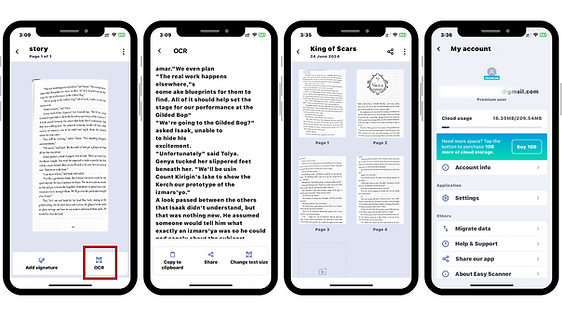
Once it's scanned, put the invoice in a folder by client, month or project. With OCR (optical character recognition), the text in your scanned documents becomes searchable. When a vendor calls asking about invoice 2047, you type the number and find it, instead of flipping through a filing cabinet. OCR also lets you copy figures out of the scan rather than retyping them, which cuts down on typos.
Approval gets faster too. Instead of walking a paper copy from office to office, you email the scan or drop it in shared cloud storage, and the person who signs off can look at it from wherever they are. Bills get paid sooner, and you have a digital copy if the original gets lost or coffee-stained.

Enhancing Expense Tracking
Expense tracking falls apart when receipts go missing. Someone pays for a client lunch, the receipt goes in a jacket pocket, and three weeks later it's gone or faded past reading.
If people scan receipts with a text scanner app right after paying, the receipt is recorded before it has a chance to disappear. There's less retyping and fewer mistakes, and nobody has to remember where they put the paper.
Sort the scans into folders by date, project or expense type. When it's time to look at where the money went, or to get ready for an audit, everything is in one place. OCR makes the scans searchable, so you can pull up every receipt from a particular vendor in a few seconds.
Scanned receipts are also easy to send to a manager for approval, so reimbursements go out faster. Employees notice when they get paid back in days instead of weeks.
Improved Approval Workflows
Approvals stall when they depend on paper moving between desks. If you digitize invoices and expense reports, you can send the scanned documents to whoever needs to review them right away, even if they're traveling.
Because OCR makes the files searchable, approvers can find a specific invoice or receipt without scrolling through dozens of attachments. Digital files can also be marked up or commented on, depending on the tools your team uses, which makes it easier to ask a question about a line item.
Many teams pair scanned documents with notifications or reminders in their accounting or project tools, so pending approvals don't get forgotten and payments go out on time. And once something is approved, you have a clear digital record of it. That makes audits and vendor disputes much simpler to sort out.
Accurate Record Keeping and Auditing
Good records are what get you through an audit without losing a week to it. Scanning invoices, receipts and tax returns gives you an organized digital archive instead of boxes in a back room, and it means a flooded basement or a misplaced folder doesn't take your records with it.
OCR turns those scans into searchable files. When an auditor asks for every payment to a supplier in the second quarter, you search instead of digging, and you're less likely to miss one.
Having a complete digital record also makes the auditor's job easier, since they can review documents without you photocopying a stack of paper for them. That helps with compliance and with accurate financial reporting.
Where to start
You don't need to scan years of old paper on day one. Start with whatever comes in this week: new invoices and new receipts, scanned the day you get them, into folders you set up once. After a month the habit is in place, and you can work back through older files when you have a quiet afternoon.
One practical tip: name each scan with the date and vendor (for example "2024-10-03 Acme invoice"). Combined with OCR search, that makes almost any document easy to find again.