Streamline Your Document Management with Easy Scanner

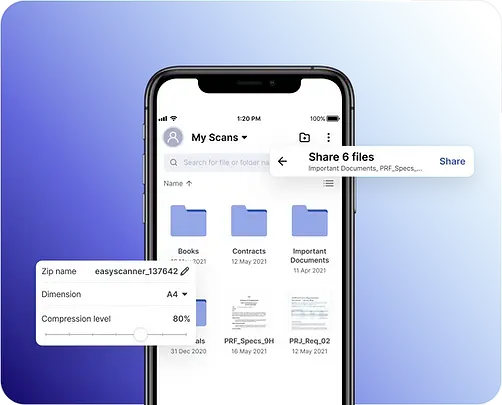
Most paperwork problems aren't about scanning. They're about finding the right page later: the receipt you need for an expense claim three weeks after the trip, or the signed lease your landlord suddenly asks for. Easy Scanner is built for that whole loop. You scan the page, it gets cleaned up and filed, and you can share it or dig it out again in a few taps.
Why choose Easy Scanner?
The app has gone through several versions over the years, each one fixing things users told us slowed them down. It also made our list of the top 5 document scanner apps. Here's what it does well.
1. High-quality scanning
Scans come out in high resolution, so small print on a receipt or the fine lines of a contract stay readable. The app detects the page edges and crops for you, which is most of what makes a phone scan look like a real one.
2. Optical character recognition (OCR)
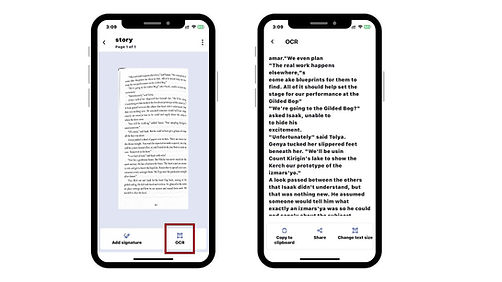
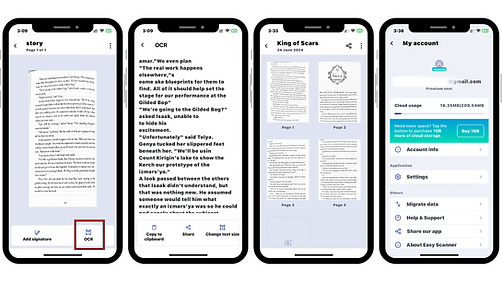
OCR reads the text in your scan and turns it into text you can edit and search, in more than 40 languages. If you've ever retyped a paragraph from a printed handout, you'll see why this is the feature people end up using most.
3. Cloud storage integration
Easy Scanner works with cloud services such as Google Drive, Dropbox and OneDrive, so your documents are backed up and you can open them on any device.
4. A simple interface
There aren't many menus to learn. Scan, save and share are all a tap or two away, and people who don't like fiddling with apps usually get it on the first try.
5. Multi-page scanning
For a ten-page contract, scan the pages one after another and save them as a single file instead of ten loose images.
Top 5 ways Easy Scanner can boost your productivity

1. Digital organization
Once a document is scanned, it goes into a folder you choose. "Taxes 2024" or "Car" is a lot easier to search than a kitchen drawer.
2. Instant sharing
Email a contract to a client or send your notes to a colleague straight from the app, as a PDF or an image.
3. Searchable documents
Because OCR picks up the text, you can type a word like "invoice" or a company name and find the scan that contains it.
4. Access anytime, anywhere
Your documents are stored in the cloud with your account, so the file you scanned on your phone is there on your tablet too.
5. Easier collaboration
Share documents with your team from Easy Scanner so everyone works from the same latest copy, not an old attachment buried in someone's inbox.
How Easy Scanner can help you go paperless
Going paperless saves paper, and it also saves you time and money. A few specifics:
1. Environmental impact
Every page you scan instead of photocopying is one less sheet printed and thrown away later.
2. Cost savings
You spend less on printing, filing cabinets and postage when documents live as files you can send.
3. Convenience
When everything is digital, you don't have to be at home or in the office to get at a document.
4. Security
Easy Scanner offers password protection and encrypted storage to keep your documents away from people who shouldn't see them.
Easy Scanner for students: organize your academic life
Students juggle notes, assignments, research papers and group projects. Here's where the app helps:
1. Scan and digitize notes
Scan your handwritten class notes after each lecture and keep them in one folder per course.
2. Manage assignments and exams
Keep graded assignments and old exam papers in one place, so they're easy to review before the next test.
3. Organize research materials
Scan pages from library books and printed articles, then sort them by project so you're not hunting for a quote the night before a deadline.
4. Share with group members
Send scanned pages to your teammates for group projects instead of passing one printout around.
Easy Scanner vs traditional scanners: why go mobile?
1. Portability
Your phone is already in your pocket. You can scan a document at a client's office or a train station without a flatbed in sight.
2. Cost
A decent desktop scanner costs real money. Easy Scanner is a cheaper alternative that still gives you good-quality scans.
3. Ease of use
No drivers, no cables, no software to install on a computer. Install the app and start scanning.
4. More features
OCR and cloud backup are things most traditional scanners don't give you without extra software.
Where to start
Pick one pile, say this month's receipts, and scan it into a single folder. Once you've searched for one of them by name and found it in seconds, the rest of your paperwork will be easier to tackle.
Download Easy Scanner and try it with the 3-day free trial.